what does these signs mean?
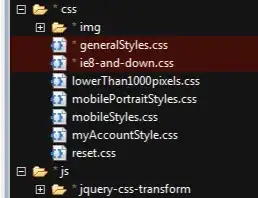
Evidently Aptana "helps" you by assuming that you're working with a team and so marks any files you've changed as requiring check in.
The way I cleared this was: right-click the Aptana project folder, choose Team, then choose Disconnect.
Cheers & hope this helps, Riley SFO

Its basically suggesting that the current version has changed from last time. However this can be switched off from the following location -
Window/Preferences, General/Appearance/Label Decorations.
Depending on what source repository you use, unchecking "Git Decorator" for example would turn this feature off.

It really depends from your configuration, as these kind of settings are theme-specific, however I would guess they signal the file on disk has changed relative to either:
HTH!

Is your project under source / version control? If so, those types of indications usually indicate modified files that have not yet been committed back to the repository.


