0

Update 2:

I have uploaded sample at https://1drv.ms/u/s!Al69FgQ8jwmZbgiBMXLLM4j5sbU?e=vyGF4m

Can you please check. I am stuck at last step. However, please confirm if other appraoch is correct.

Update 1:

I have confirmed the flow. So I am clear on it.

As part of that digital signing PDF document flow , We want to use third party to provide Signed Hash of PDF. Here are steps:

  1. There is 3rd party inhouse system which will generate PDF document from word.
  2. That PDF will be send to another service which will generate Hash value of that PDF
  3. That hash value will be send to external service to sing hash with private key.
  4. external system will send signed hash and public key certiciate using which in house service will add signature in PDF document.

I have following questions.

  1. In point 1 above inhouse service is creating PDF along with signature block . Is it necessary to create signature block? as this is deferred signing?
  2. If so, how can service in point 2 can get original content of PDF document for generating hash.

we have used existing PDF which has signature and using iText 7 to get original content. Is this method correct? FormB.PDF has signature and by removing signaure1 field we are getting original content. Will this process work and advistable?

We also tried to use pdfsigner.getRangeStream() method, but its not that clear in documentation and not yet clear. Please help

package com.abc.sd;

import java.io.IOException;
import java.security.NoSuchAlgorithmException;
import java.util.List;

import com.itextpdf.forms.PdfAcroForm;
import com.itextpdf.kernel.pdf.PdfDocument;
import com.itextpdf.kernel.pdf.PdfReader;
import com.itextpdf.kernel.pdf.PdfWriter;
import com.itextpdf.signatures.SignatureUtil;

public class ItextPdf7 {

    public static void main(String [] args) throws IOException, NoSuchAlgorithmException {
        String filePath ="C:\\\\abc\\\\test\\\\FormB.pdf";
        PdfReader reader = new PdfReader(filePath);
        PdfDocument pdfDoc = new PdfDocument(reader);
        PdfAcroForm form = PdfAcroForm.getAcroForm(pdfDoc, false);
        SignatureUtil signUtil = new SignatureUtil(pdfDoc);
        List<String> names = signUtil.getSignatureNames();
        System.out.println("Signature Name>>>"+names);
      //  System.out.println("Singature Data>>"+signUtil.readSignatureData("Signature1"));


        PdfReader reader1 = new PdfReader(filePath);
        PdfDocument pdfDoc1 = new PdfDocument(reader1, new PdfWriter("C:\\\\\\\\abc\\\\\\\\test\\\\\\\\unsigned_latest_iext7.pdf"));
        PdfAcroForm form1 = PdfAcroForm.getAcroForm(pdfDoc1, true);
        form1.flattenFields();
        pdfDoc1.close();


    }

}

******************************

We are looking to sign PDF document. here are steps as per my understanding.

  1.      Consumer will send a digest of PDF document to Central System. The digest of the PDF will exclude the signature section

  2.       Central System will send the digest (signed using consumer’s private key/public key ? not sure) to consumer

  3.       consumer system will add digest within in the signature section the PDF document (may be along with public key ??)

Can you please help on following.

  1. If my understanding is correct with above flow? Any small reference guide / link will help or any flow diagram.

  2. With .Net and Java what are libraries which can do this work ?Both open source and paid. Will iTextSharp is relevant here?

  3. How validation will happen if customer opens the PDF? If there any specific action required document signing?

Plz help.

  • *"If my understanding is correct with above flow?"* - How can we tell? You have to know your use cases. In particular, what kind of solution are you looking for: Shall it be an application running on the client side only? Shall it be a web service with only a web browser on client side? Shall it be some combination of client and server side programs? Furthermore, where are the private keys? On the client computer? On your server? On some external, third-party sign server? – mkl Oct 21 '19 at 13:47
  • *"With .Net and Java what are libraries which can do this work ?Both open source and paid. Will iTextSharp is relevant here?"* - Strictly speaking library recommendations meanwhile are off-topic on stack overflow. the Stack Exchange Software Recommendation site might be appropriate for this question. – mkl Oct 21 '19 at 13:49
  • *"How validation will happen if customer opens the PDF? If there any specific action required document signing?"* - First of all, it depends on the nature of the signing certificates used. Are they self-signed? Are they signed by a certificate authority not generally trusted? Or are they signed by a certificate authority on the AATL or EUTL? Furthermore, which is the legal context that validation shall execute in? And in which PDF processors do you expect your signed PDFs to be opened and validated? – mkl Oct 21 '19 at 13:54
  • Hi mkl, We are looking for small utility application running on server side, which exposes web services to which we can supply the PDF, encrypted , public/private key, which it will embed sign in PDF and send the raw data back to service consumer. – AlwaysDeveloper Oct 22 '19 at 03:23
  • Thanks. I will check on Software recommendation site. – AlwaysDeveloper Oct 22 '19 at 03:25
  • It will be signed by CA. User should open in Acrobat reader. When signature is embedded, I guess we can right click and validate the signature in PDF reader. Do we need public key embedded along with signature in PDF? – AlwaysDeveloper Oct 22 '19 at 03:26
  • You may want to [edit] your question text to include all these information. – mkl Oct 22 '19 at 07:19
  • Now. I have understood. I am correcting my questions. – AlwaysDeveloper Nov 08 '19 at 08:50
  • What exactly do you call a *signature block*? An empty signature field? Or a filled signature field where merely the **Contents** placeholder is unfinished? Or something entirely different? – mkl Nov 08 '19 at 21:26
  • It is empty signature block field. This is case of external signing/deferred signing. – AlwaysDeveloper Nov 09 '19 at 01:35
  • The pdf format does not define any "block" fields. Thus, I assume you simply mean an empty signature field (a specific **AcroForm** field). You ask whether it is necessary. It is not necessary per se but it can be helpful if you want your signature to have a visualization, a visible widget, because usually the original pdf creator can tell best where to put that visualization. – mkl Nov 09 '19 at 06:19
  • I don't understand your second question about that 'original content'. For signing the pdf will be updated first with a preliminary value containing a placeholder for the cms signature container, then the hash is calculated for everything but that placeholder. – mkl Nov 09 '19 at 08:20
  • `pdfsigner.getRangeStream()` is used but usually not by you directly. Instead you implement the external signature container interface which gets the range stream as a callback argument. – mkl Nov 09 '19 at 08:24
  • Yes. I agree . I agree that Hash is calculated with everything except that place holder. Thats what I understood from getRangeStream() method. Can you please help me to point to code snippest which I can use. Currently I am going to start PoC with following link : https://stackoverflow.com/questions/47505696/itext-pdf-deferred-signing-results-in-pdf-with-invalid-signature – AlwaysDeveloper Nov 09 '19 at 10:35
  • @mkl , two more points , 1. Signed data will be PKSC1 standard. 2. Only public certificate & signed data will be available while embedding signature in PDF. – AlwaysDeveloper Nov 10 '19 at 06:57
  • That's bad. For a signature acceptable in many legal contexts you'll need the certificate *before* requesting the PKCS1 signature because a reference to the certificate must be included in the signed attributes. – mkl Nov 10 '19 at 23:22
  • Sorry @mkl, did not get you. My understanding if only for signing data I need private key , which is already taken care by 3rd party system. So after I get signed data (after reading PDF hashing it) , I will need only public key (.pem) and signed has data . Isn't that sufficient to embed already created signature container – AlwaysDeveloper Nov 11 '19 at 02:47
  • I have uploaded the sample c# project which I am working on. Can you please check if Its in right direction? I have uploaded at https://1drv.ms/u/s!Al69FgQ8jwmZbgiBMXLLM4j5sbU?e=vyGF4m – AlwaysDeveloper Nov 11 '19 at 04:18
  • @mkl , I am referring to this link - https://itextpdf.com/en/resources/books/blockchain-pdf-documents/pdf-and-digital-signatures .. It says ****The minimum information that needs to be stored inside the signature consists of: 1.The signed message digest, and 2.The signer's certificate (containing the public key that corresponds with the private key that was used for signing).*********** – AlwaysDeveloper Nov 11 '19 at 04:35
  • Which is the context in which those signatures shall be validated? In particular which is the validation policy. E.g. if a PAdES baseline signature is created and the validation policy is as defined by the matching ETSI documents, the signer certificate must be referenced from the attributes which are signed. Thus, you need the certificate before building those attributes and signing them. – mkl Nov 11 '19 at 14:09
  • I know we need to use PAdES and LTV. I am not sure of the very internal of this as of now. If you refer the https://itextpdf.com/en/resources/books/blockchain-pdf-documents/pdf-and-digital-signatures under Figure 2 is says that to embed in PDF we need two things and both of these I will have when I want to embed. I have referred few examples like https://stackoverflow.com/questions/54559547/external-signing-pdf-with-itext and it shows that its possible to do. Unfortunately most of examples are in iText 5.x. Am I missing anything here? – AlwaysDeveloper Nov 11 '19 at 15:31
  • Can you please guide the way forward? – AlwaysDeveloper Nov 11 '19 at 15:38

1 Answers1

5

There are very many aspects and sub-questions here, both in the question text and in the comments thereunder. This answer illuminates but some of them after first presenting some backgrounds.

Some backgrounds

An integrated PDF signature implies the presence of a number of structures in a PDF:

  • A signature AcroForm form field. This form field can have a widget annotation (a visualization which can contain any information you care to put into it) but it does not need to have one.

  • A value in this signature form field. Unlike other form fields, the value of a signature field is not a mere string but a dictionary of key-value pairs. The contents differ depending on the exact type of signature. In case of the interoperable types, though, there always is a Contents entry whose value is a binary string containing the actual PKCS1/PKCS7/CMS/RFC3161 signature or time stamp which covers the whole file except this binary string.
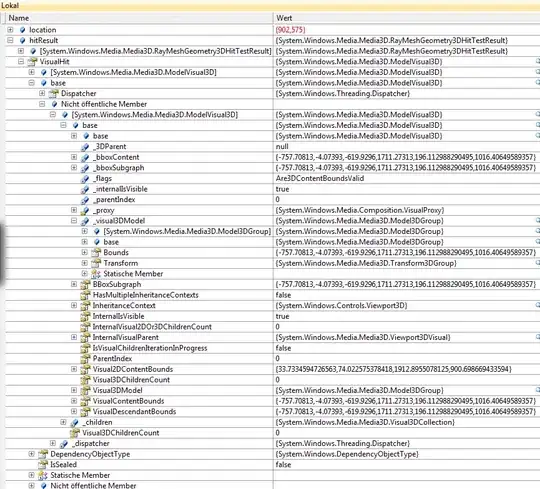
    PDF signature sketch

    (The sketch is a bit misleading: the '<' and '>' hex string delimiters are not part of the signed data.)

  • In case of type adbe.x509.rsa_sha1 the Contents entry contains a PKCS1 signature. The signature value dictionary additionally must contain a Cert entry containing the signing certificate.

  • In case of type ETSI.RFC3161 the Contents entry contains a RFC 3161 time stamp token.

  • In case of types ETSI.CAdES.detached, adbe.pkcs7.detached, and adbe.pkcs7.sha1 the Contents entry contains a CMS signature container. As the signature container can hold the signing certificate, there is no need for a Cert entry for the signing certificate.

    A CMS signature container can contain a structure of "signed attributes". If it does, one of these attributes must be the hash of the signed PDF bytes (see above, everything but the Contents value) and the actual signature bytes wrapped in the container sign these signed attributes. Whether the variant without signed attributes is allowed and which attributes additionally are required, depends on the exact type of the signature.

  • In case of ETSI.CAdES.detached, the CMS container must contain signed attributes. Furthermore, one of the signed attributes must be an ESS signing-certificate or signing-certificate-v2 attribute referencing the signer certificate.

    LTV information in this case can be added later in an incremental update to the PDF, they need not be present in the signed PDF.

  • In case of adbe.pkcs7.detached and adbe.pkcs7.sha1 there generically do not need to be signed attributes. Depending on the exact signing policy (prescribed by law or contract), though, signed attributes and in particular the ESS signing certificate signed attribute may be required nonetheless.

    These signature types were already defined in ISO 32000-1. If one's signature policy is based on ISO 32000-1 alone, LTV information must be stored in the adbe-revocationInfoArchival attribute which must be a signed attribute.

Is the signing certificate required before signing?

In comments you reference the iText "PDF and Digital Signatures" ebook which appears to say that it suffices to retrieve the signing certificate together with the signature.

In the light of the backgrounds explained above, though, we realize that

  • In case of adbe.x509.rsa_sha1 signatures, the signing certificate must be in the value of the Cert entry of the signature value dictionary. As this entry is not in the Contents entry, this certificate is part of the signed data. Thus, it must be known before signing.

  • In case of ETSI.CAdES.detached signatures, the signed attributes must contain an ESS signing-certificate or signing-certificate-v2 attribute. This attribute references the signer certificate. Thus, it must be known before signing.

  • In case of adbe.pkcs7.detached and adbe.pkcs7.sha1 it depends on the actual signature policy one has to adhere to whether or not an ESS signing-certificate or signing-certificate-v2 attribute is required. Thus, it depends whether or not the signing certificate needs to be known before signing.

    In case of a signature policy based on ISO 32000-1 alone, though, LTV information must be stored in a signed attribute if at all, and to retrieve LTV information, one obviously needs to know the certificates for which one attempts to retrieve them, in particular the signer certificate.

To answer the question in this topic's header, therefore: Only in context of a lax signature policy you can get away with not knowing the signer certificate before signing as long as you don't need to add LTV information.

And in case of PAdES signatures?

In a comment you mention you need to use PAdES and LTV. Does that mean you need the signer certificate before signing?

Well, it depends.

If using PAdES means using PAdES baseline profiles or extended PAdES profiles (BES/EPES), you have to create ETSI.CAdES.detached signatures. Thus, you do need the signer certificate before signing.

But if it only requires the PAdES profile for CMS digital signatures in PDF (essentially the ISO 32000-1 compatibility profile), you don't need the signer certificate before signing.

But this profile implies in particular: If present, any revocation information shall be a signed attribute of the PDF Signature. Thus, for "PAdES and LTV" you again do need the signer certificate before signing.

How to create a PDF signature without knowing the signer certificate early

So there are setups in which you shouldn't need the signer certificate before calculating the actual signature. Usually, though, security APIs require the certificate early nonetheless.

Using Bouncy Castle low-level APIs you can do that as follows. (I assume you are using SHA256withRSA.)

First prepare the PDF and determine the hash value

byte[] Hash = null;

using (PdfReader reader = new PdfReader("original.pdf"))
using (FileStream fout = new FileStream("prepared.pdf", FileMode.Create))
{
    StampingProperties sp = new StampingProperties();
    sp.UseAppendMode();

    PdfSigner pdfSigner = new PdfSigner(reader, fout, sp);
    pdfSigner.SetFieldName("Signature");

    PdfSignatureAppearance appearance = pdfSigner.GetSignatureAppearance();
    appearance.SetPageNumber(1);

    int estimatedSize = 12000;
    ExternalHashingSignatureContainer container = new ExternalHashingSignatureContainer(PdfName.Adobe_PPKLite, PdfName.Adbe_pkcs7_detached);
    pdfSigner.SignExternalContainer(container, estimatedSize);
    Hash = container.Hash;
}

Now the hash of the PDF bytes to sign is in Hash.

The ExternalHashingSignatureContainer class used here is the following helper class:

public class ExternalHashingSignatureContainer : ExternalBlankSignatureContainer
{
    public ExternalHashingSignatureContainer(PdfName filter, PdfName subFilter) : base(filter, subFilter)
    { }

    public override byte[] Sign(Stream data)
    {
        SHA256 sha = new SHA256CryptoServiceProvider();
        Hash = sha.ComputeHash(data);
        return new byte[0];
    }

    public byte[] Hash { get; private set; }
}

For the hash calculated above in the Hash variable you can now request a PKCS#1 signature and the signer certificate. Then you can construct the CMS container as follows:

byte[] signatureBytes = THE_RETRIEVED_SIGNATURE_BYTES;
byte[] certificateBytes = THE_RETRIEVED_CERTIFICATE_BYTES;

X509Certificate x509Certificate = new X509CertificateParser().ReadCertificate(certificateBytes);

SignerIdentifier sid = new SignerIdentifier(new IssuerAndSerialNumber(x509Certificate.IssuerDN, x509Certificate.SerialNumber));
AlgorithmIdentifier digAlgorithm = new AlgorithmIdentifier(NistObjectIdentifiers.IdSha256);
Attributes authenticatedAttributes = null;
AlgorithmIdentifier digEncryptionAlgorithm = new AlgorithmIdentifier(Org.BouncyCastle.Asn1.Pkcs.PkcsObjectIdentifiers.Sha256WithRsaEncryption);
Asn1OctetString encryptedDigest = new DerOctetString(signatureBytes);
Attributes unauthenticatedAttributes = null;
SignerInfo signerInfo = new SignerInfo(sid, digAlgorithm, authenticatedAttributes, digEncryptionAlgorithm, encryptedDigest, unauthenticatedAttributes);

Asn1EncodableVector digestAlgs = new Asn1EncodableVector();
digestAlgs.Add(signerInfo.DigestAlgorithm);
Asn1Set digestAlgorithms = new DerSet(digestAlgs);
ContentInfo contentInfo = new ContentInfo(CmsObjectIdentifiers.Data, null);
Asn1EncodableVector certs = new Asn1EncodableVector();
certs.Add(x509Certificate.CertificateStructure.ToAsn1Object());
Asn1Set certificates = new DerSet(certs);
Asn1EncodableVector signerInfs = new Asn1EncodableVector();
signerInfs.Add(signerInfo);
Asn1Set signerInfos = new DerSet(signerInfs);
SignedData signedData = new SignedData(digestAlgorithms, contentInfo, certificates, null, signerInfos);

contentInfo = new ContentInfo(CmsObjectIdentifiers.SignedData, signedData);

byte[] Signature = contentInfo.GetDerEncoded();

Now the CMS signature container bytes are in Signature.

For the above please use these BouncyCastle usings

using Org.BouncyCastle.Asn1;
using Org.BouncyCastle.Asn1.Cms;
using Org.BouncyCastle.Asn1.Nist;
using Org.BouncyCastle.Asn1.X509;
using Org.BouncyCastle.Crypto;
using Org.BouncyCastle.Crypto.Signers;
using Org.BouncyCastle.Pkcs;
using Org.BouncyCastle.X509;

You can now embed the signature container bytes into the PDF like this:

using (PdfReader reader = new PdfReader("prepared.pdf"))
using (PdfDocument document = new PdfDocument(reader))
using (FileStream fout = new FileStream("signed.pdf", FileMode.Create))
{
    PdfSigner.SignDeferred(document, "Signature", fout, new ExternalPrecalculatedSignatureContainer(Signature));
}

The ExternalPrecalculatedSignatureContainer class used here is the following helper class:

public class ExternalPrecalculatedSignatureContainer : ExternalBlankSignatureContainer
{
    public ExternalPrecalculatedSignatureContainer(byte[] cms) : base(new PdfDictionary())
    {
        Cms = cms;
    }

    public override byte[] Sign(Stream data)
    {
        return Cms;
    }

    public byte[] Cms { get; private set; }
}

As mentioned above, though, this signature container is not a CAdES container. Thus, your PDF signatures won't be true PAdES signature (baseline or extended profiles) but at best ISO 32000-1 compatibility PAdES signatures.

The problem in your test code based on the above

Your Client method createSignedData looks like this:

public byte[] createSignedData(byte[] sh)
{
    string dire = Directory.GetParent(Directory.GetParent(Directory.GetCurrentDirectory()).ToString()).ToString();
    string PROPERTIES = dire + "\\resources\\signkey.properties";
    Properties properties = new Properties();
    properties.Load(new FileStream(PROPERTIES, FileMode.Open, FileAccess.Read));
    String path = properties.GetProperty("PRIVATE");
    char[] pass = properties.GetProperty("PASSWORD").ToCharArray();
    string alias = null;
    Pkcs12Store pk12;
    pk12 = new Pkcs12Store(new FileStream(path, FileMode.Open, FileAccess.Read), pass);
    foreach (var a in pk12.Aliases)
    {
        alias = ((string)a);
        if (pk12.IsKeyEntry(alias))
            break;
    }

    ICipherParameters pk = pk12.GetKey(alias).Key;
    IExternalSignature pks = new PrivateKeySignature(pk, DigestAlgorithms.SHA256);
    byte[] data = pks.Sign(sh);
    return data;

}

Unfortunately PrivateKeySignature.Sign expects the message to sign in the sh parameter and in particular first hashes it. In your use case on the other hand sh already is the hash of the message to sign. Thus, you effectively hash twice where you should hash but once.

You can fix this by replacing

IExternalSignature pks = new PrivateKeySignature(pk, DigestAlgorithms.SHA256);
byte[] data = pks.Sign(sh);

in the code above by

StaticDigest digest = new StaticDigest();
digest.AlgorithmName = "SHA-256";
digest.Digest = sh;
RsaDigestSigner signer = new RsaDigestSigner(digest);
signer.Init(true, pk);
byte[] data = signer.GenerateSignature();

Here StaticDigest is the following helper class:

public class StaticDigest : IDigest
{
    public string AlgorithmName { get; set; }
    public byte[] Digest { get; set; }

    public void BlockUpdate(byte[] input, int inOff, int length)
    { }

    public int DoFinal(byte[] output, int outOff)
    {
        Array.Copy(Digest, 0, output, outOff, Digest.Length);
        return Digest.Length;
    }

    public int GetByteLength()
    {
        return 64;
    }

    public int GetDigestSize()
    {
        return Digest.Length;
    }

    public void Reset()
    { }

    public void Update(byte input)
    { }
}

After this change your test project returns mathematically valid signatures.

mkl
  • 90,588
  • 15
  • 125
  • 265
  • Thanks @mkl. I went through the information . Will try to understand further. As of now, what I know is: 1. Return values from third party service is PEM value of user certificate (public key) in string 2. PKCS1 signature - signed data I am not sure of exact requirements in PAdES. I will check on that. Meanwhile can you please help me with how shall i move forward with above facts? I want to first ensure that with above info I am able to do embed signature using iText. Even i have created sample Code also. – AlwaysDeveloper Nov 12 '19 at 02:43
  • @AlwaysDeveloper I had a look at some classes for creating CMS signature containers. Unfortunately they all expect to know the signing certificate beforehand. It of course is possible to build the container in own code but the result would be code which is difficult to maintain. Thus, please check whether there is a way to differently address the signature service you use. Probably there also is a call returning a CMS/PKCS7 signature container. Or there is a call to peek at the signer certificate beforehand. There should be, otherwise that service is not ready for use in the 21st century yet. – mkl Nov 12 '19 at 10:10
  • I hope when you said singing certificate means its public certificate only and not private key. In that case, Is it possible to create empty container with different signing certificate (public key) and replace it with actual signing certificate(public key) when we get the response from third party service which returns both public key and signed hash value ? – AlwaysDeveloper Nov 12 '19 at 13:00
  • *"I hope when you said singing certificate means its public certificate only and not private key."* - Yes, of course. The private key is not part of the certificate. Only Microsoft APIs are a bit weird and consider the private key an annex to the certificate. – mkl Nov 12 '19 at 13:09
  • *"Is it possible to create empty container with different signing certificate (public key) and replace it with actual signing certificate(public key) when we get the response from third party service"* - the result of that would be code even less maintainable than constructing the container manually in the first place. – mkl Nov 12 '19 at 13:11
  • _the result of that would be code even less maintainable than constructing the container **manually** in the first place_ What exactly mean by manually ? I agree that it will have some maintenacne issue, but will it be inappropriate? . Would you mind me sharing Java/.Net code example of this scenario which I can use try out? If readily available or can provide some reference link. – AlwaysDeveloper Nov 12 '19 at 13:21
  • *"What exactly mean by manually ?"* - I mean not using high level API calls creating the signature container in less than ten lines of code but instead low level API calls, plugging pieces together in own code, in more than 10 lines of code. I don't have any code for that ready because in my use cases I always have the signer certificate available early enough to use the high level API calls. Essentially I would dig into the BouncyCastle code to find the code underneath that actually builds the signature container and change it for your use case. – mkl Nov 12 '19 at 13:40
  • ,I really appreciate your help. Will you be able to provide that code for this use case? – AlwaysDeveloper Nov 14 '19 at 04:23
  • Could you please confirm on this. Also is there any other tools , shall I give a try which can do. e.g PDFBox or anything like that? – AlwaysDeveloper Nov 15 '19 at 07:52
  • What you essentially need is code that creates less secure signature containers as signing without the ESS signing-certificate or signing-certificate-v2 offers more attack vectors on your signatures. This code you then can use with itext or pdfbox or other pdf libraries. Sensibly hardly anyone advertises his code by saying "we can sign less securely". – mkl Nov 15 '19 at 08:02
  • but this - https://stackoverflow.com/questions/29251895/pdf-signature-digest says : **In case of SubFilter ETSI.CAdES.detached or adbe.pkcs7.detached you can create the document digest without knowing someone's certificate beforehand.** So as I said, I will get certificate but not before hand during Presign. I will get it in PostSign only after I get reruned signed has from server . At that time I can add that in signature. – AlwaysDeveloper Nov 15 '19 at 08:12
  • As you quoted, the *document digest*. As described in my answer here, too, the certificate is part of the document digest only in case of **adbe.x509.rsa_sha1** signatures. But in case of **ETSI.CAdES.detached** and more strictly profiled **adbe.pkcs7.detached** signatures you need the signer certificate before *requesting the signature bytes* as the certificate is referenced from the signed attributes. As had been said both in my answer here and in the answer you linked. – mkl Nov 15 '19 at 09:20
  • @AlwaysDeveloper in short, therefore, if your signing service indeed only can be used as you claim (and it uses a new certificate every time), you cannot use it for generating valid **ETSI.CAdES.detached** pdf signatures. Period. – mkl Nov 15 '19 at 09:25
  • Sorry. , so I will read some articles again to understand **strictly profiled**. However, just **2 questions** right now 1. As per our external service which signs the hash value it will return client certificate Base64 string in PEM format. And Signed Data type is PKCS1. Stil I can use adbe.pkcs7.detached subfilter? _2nd Question to follow_ – AlwaysDeveloper Nov 15 '19 at 09:30
  • My 2nd Question is , to mimic that scenario as part of PoC I am generating PEM file using below steps. Is this correct , is this key generated is PKCS#1 and output is certificate exported is PEM format? ******* _keytool -genkey -alias selfsigned -keyalg RSA -keypass password -storepass password -keystore C:\test\keystore.jks_ _keytool -export -alias selfsigned -storepass password -file C:\test\server.cer -keystore C:\test\keystore.jks_ Then I export file server.cer as 'Base-64 encoded X.509 CER'. The output file I use it as my PEM input (as it it was sent from external service). – AlwaysDeveloper Nov 15 '19 at 09:32
  • Concerning the second question: I would ask the service provider for an example output because there may be small differences in what people *exactly* mean by PEM format. – mkl Nov 15 '19 at 10:18
  • yes It is here . _Please have look at the screenshot in this link_ https://www.dropbox.com/sh/mwp54inkj7jxjjv/AADQM1ut5tYrx60eOCNE2Dexa?dl=0 What exactly I shall verify in this. Also, can you please share your view on 1st question. – AlwaysDeveloper Nov 15 '19 at 10:55
  • What I see there is just part of a certificate, it is incomplete, its later parts are missing. Have you cut it of? Concerning the first question, you construct a CMS signature container around that P1 signature, so that signature type is uk. – mkl Nov 15 '19 at 14:19
  • Many thanks for bearing with me . The screenshot has public certificate sample in PEM format. I did not cut anything off. What's wrong in that? On first question, yes, I am creating CMS signature container. Here is complete code - Client Server use case( - External signing. https://www.dropbox.com/sh/mwp54inkj7jxjjv/AADQM1ut5tYrx60eOCNE2Dexa?dl=0 – AlwaysDeveloper Nov 15 '19 at 17:51
  • *"What's wrong in that?"* - it appears to be too short. *"I am creating CMS signature container"* - yes. But with a signet certificate known beforehand. – mkl Nov 15 '19 at 22:14
  • @AlwaysDeveloper I added proof-of-concept code to the answer that shows how to create a PDF signature if the signer certificate is not available before the signature bytes are requested. – mkl Nov 16 '19 at 22:17
  • Many thanks for your sample code . I couldn't check it yesterday. I will check and share my feedback today. – AlwaysDeveloper Nov 19 '19 at 07:24
  • We are able to generate PDF, but It shows document is altered or modified. We have not done any change from what you shared above,except, the hash generation function is our own code. I will try to share exact code tomorrow. – AlwaysDeveloper Nov 19 '19 at 13:52
  • *"We have not done any change from what you shared above,except, the hash generation function is our own code."* - I tested the code above as is and Adobe Reader does not complain. Thus, I'm afraid the issue likely is either in your hash generation code or your signing server implementation or in your integration of either into the code above. *"I will try to share exact code tomorrow."* - Please also share the PDFs involved; quite likely I won't have access to your signing server and, therefore, cannot run your code. – mkl Nov 19 '19 at 16:37
  • Please find complete code at _https://drive.google.com/file/d/1610aUWpa4frt2AabFJhOBJNt6bUtP8R2/view?usp=drivesdk_ It also has external services code which signs hash. P12 certificate and other resources also part of the code. Again ,really appreciate your support. – AlwaysDeveloper Nov 20 '19 at 11:22
  • @AlwaysDeveloper The bug was in the `Client` code. Effectively your data were wrongly hashed twice. See the edit to my answer for a possible fix. – mkl Nov 20 '19 at 16:40
  • Thanks a lot @mkl , Its working except just one issue. In "Digitally Signed by " does not have value. I guess it picksup values from Certificate. – AlwaysDeveloper Nov 21 '19 at 07:50
  • *"In "Digitally Signed by " does not have value. I guess it picksup values from Certificate."* - Indeed, from where else. By the way, that "Digitally signed by ..." text in the signature visualization is part of the signed document. Thus, if you need a sensible text there, you have to set it (`SetLayer2Text`) beforehand. If you don't have that information beforehand, you can try and change the appearances in an incremental update, see [this answer](https://stackoverflow.com/a/37070234/1729265). This will normally show as a change, though. – mkl Nov 21 '19 at 14:08